TEAM
Chaehyeon Kang · Jiwon Lee · Josh Lu · Sejoon Kim · Timi Dare
TOOLS / SYSTEM
Figma · FigJam · Zoom
PROJECT TYPE
UX Research · Usability Study

Interface explorations by our design lead during the 2024 study. Panel titles are the original labels from the 2024 report.
Starting from a hypothesis
Published research suggested that many Gmail users still felt overloaded by email, and that people who expected folders found the label system confusing.
Our team began with a hypothesis: Gmail’s organization and time zone features might be making it harder for professionals to stay productive and communicate globally. We focused on professionals because email carries much of their work, and more of that work now crosses time zones.
The research lead and I mapped what we already knew about users, their context, and the system, and where their expectations broke down. That map set what the study needed to observe.
A problem written before testing is a hypothesis. The study exists to test it.

The CDE matrix separated what was clear, what was in tension, and what users expected, across users, context, and the system.
Turning a hypothesis into tasks we could watch
We needed to see where people struggled while they worked. We turned each part of the hypothesis into a scenario that a participant would perform in a prepared inbox.
The four scenarios covered managing high email volume, organizing information and files, protecting important email, and scheduling across time zones. Each goal could be reached in many ways, so we chose specific features to make success measurable. Together they broke into nine steps: bulk selection, archive, filters, labels, search, spam, starred and important, tabs, and scheduled send.
For each step we set the same success criteria: time to complete, number of errors, and how easy the participant found it.
A task shows what a participant does. A question only shows what they remember doing.

Four scenarios broke into nine steps, each built around one Gmail feature.
Keeping six sessions comparable
Each session ran over Zoom on a dedicated Google test account. We reset the account to the same starting state before every session, so each participant began with the same inbox and the same emails. Participants used remote control to operate it on the moderator’s screen, and the note taker could follow the cursor as well as the voice.
Each session had a moderator and a note taker. The research lead and I split the sessions as moderators, working from the same script. In my sessions, I introduced each task, responded when something unexpected happened, and asked follow-up questions when a participant hesitated. Teammates took notes, recording what participants said, what they did, and how they reacted at each step.
Every note was tagged with its step and the participant’s reaction. That let us compare the same step across sessions. Creating labels drew satisfaction in one session and surprise or impatience in others.
When every session starts the same way, differences between participants carry meaning.

Notes from each session were tagged by step and by the participant's reaction.
Finding patterns beyond task failure
The research lead and I synthesized 71 data points across three rounds of affinity mapping. Teammates had recorded them in two colors: 44 described what participants did, and 27 captured what they said or how they reacted. The distinction let us see where observed behavior aligned with what participants said and where it did not.
In the second round, we grouped related notes into ten clusters. Six pointed to a specific feature, such as archive, labels, or scheduled send. Four described behavior that appeared across features: hesitating, succeeding by chance, finding features unintuitive, and feeling satisfied. One of the six, about switching between Gmail and Drive, rested on a single note, so it did not carry into the final round. The other nine drew on notes from several sessions.
In the third round, four broader insights remained, no longer tied to individual features. We counted successes as evidence alongside failures. A participant who skipped the filter and found an email by searching told us as much as one who could not finish a task.
Where people fail matters. Where they fall back matters just as much.

71 data points became ten clusters and then four insights. Feature names dropped out in the final round.
One path through the synthesis

Success was evidence too. Completing a task through a familiar workaround helped explain why less familiar features went unused.
Interpreting the four insights together

We arranged the four insights into a sequence suggested by the six sessions. It shows how the pattern could reinforce itself, though the study did not test that relationship directly.
Key finding
When a feature was unfamiliar or hard to find, participants returned to a workflow they already trusted. Sometimes that workaround got them to the same outcome. Sometimes it did not.
From evidence to design direction
After synthesis, the team turned the findings into design directions. Each one named a breakdown we had observed and the change it called for. Our UX design lead then explored those directions within Gmail’s existing interface.
The evidence was not equally strong across every direction, and the explorations did not always address the full finding. Some breakdowns recurred across sessions and gave us stronger grounds for a design direction. Others appeared only once or extended beyond what the study directly supported. We kept those distinctions visible, so each exploration shows both the strength of its evidence and what it actually addresses.
Not every direction deserves the same confidence.
Lower-confidence directions can still be explored as long as they are not presented with the same certainty.
Supported across sessions
01 · Setting email aside
EVIDENCE
Participants had trouble finding where to move email out of the active inbox. One could not find spam and deleted the email instead.
IMPLICATION
Make archive, spam, and other removal destinations easier to locate and distinguish.
EXPLORATION
Spam, Trash, and Archived grouped under one sidebar heading.

02 · Scheduled send
EVIDENCE
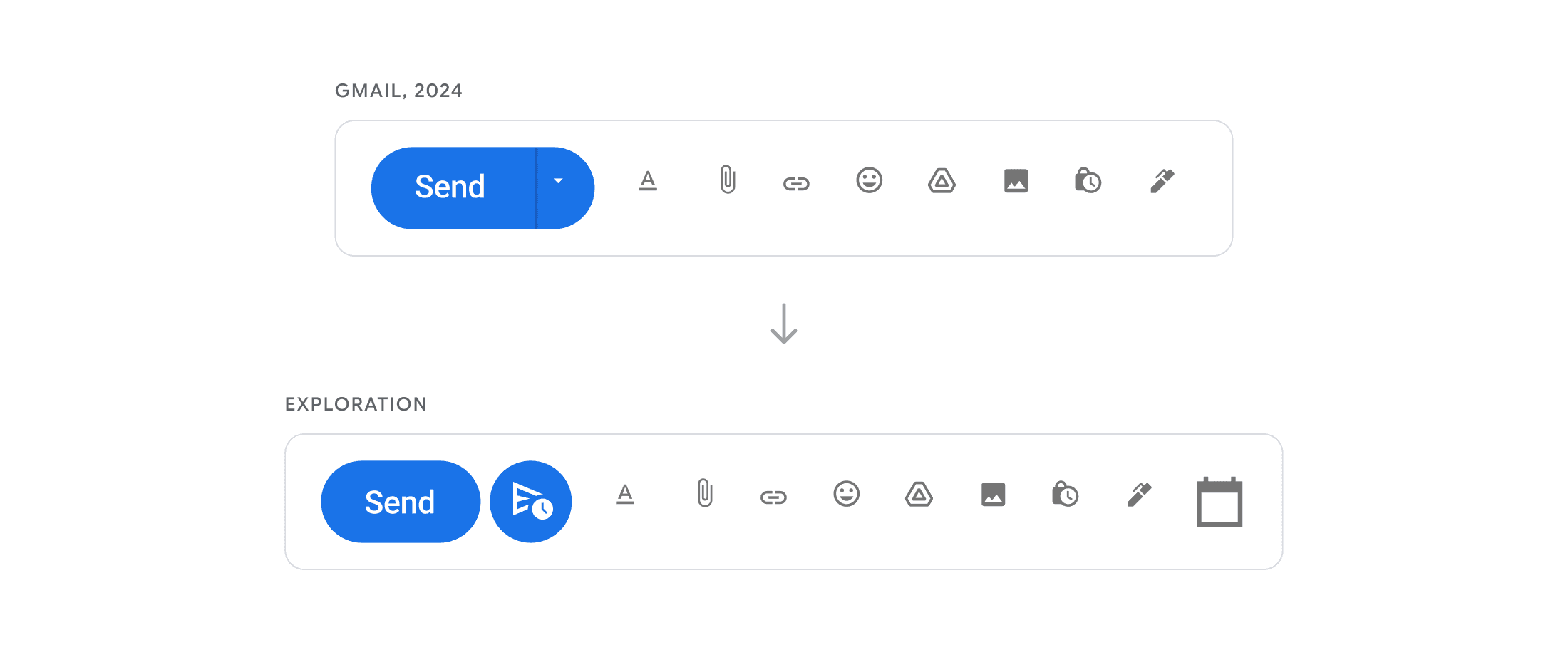
Several participants took a long time to find scheduled send. One could not find it and sent a calendar invite instead.
IMPLICATION
Make scheduled send discoverable at the point of sending.
EXPLORATION
A schedule button beside Send.
Partially addressed
03 · Moving between tabs
EVIDENCE
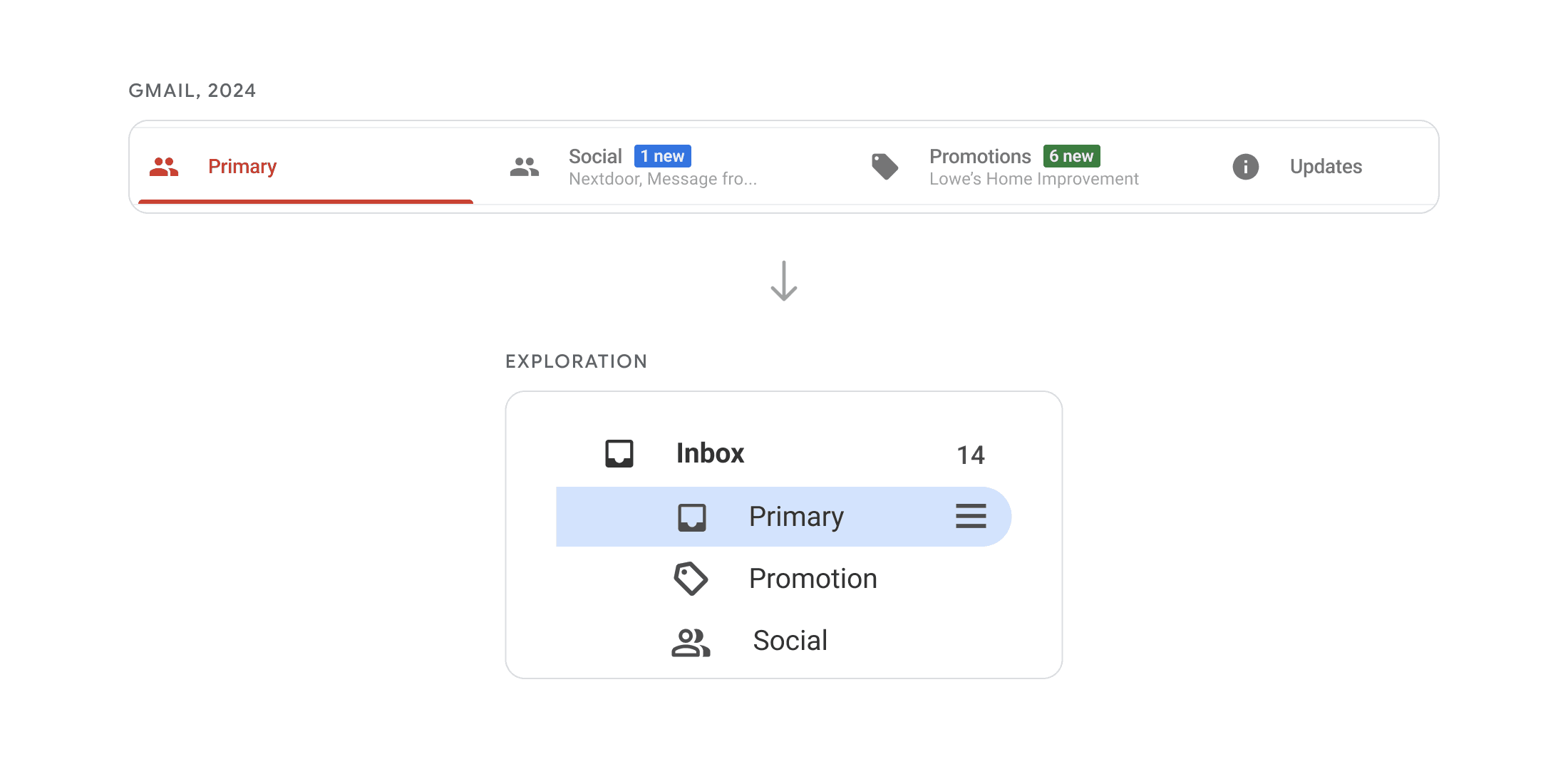
Moving email between tabs felt unclear, and some participants worried future email would be missed.
IMPLICATION
Make the structure of the inbox tabs clearer.
EXPLORATION
Tabs nested under Inbox.
OPEN QUESTION
The exploration clarified where the tabs live. What happens to future email after a move remained unanswered.
LIMITED EVIDENCE
Starred and Important as separate priority states
One session.
Each recipient’s local time when scheduling
Mostly one session.
NOT DIRECTLY SUPPORTED
Inbox grouped by sender
A design exploration without a direct research finding.
Interface explorations by our UX design lead.
What I would change about the study
Each of our four goals could be reached through many Gmail features. To make success measurable, we chose a few features for each goal and named them in the tasks. That let us see whether participants knew each feature, used it, and could use it. It could not show whether they would think of that feature at all when facing the goal alone. Even when a task named the filter, a participant searched instead. Next time, I would pair feature-named tasks with goal-based ones, such as gathering every email about a quarterly budget in one place.
We set success criteria before testing: time, errors, and ease. Synthesis showed that finishing a step and reaching its intended outcome could differ. A participant who deleted an email in place of moving it to spam finished the step and missed the outcome. I would define the intended outcome of each step in advance, and record the path a participant took separately from the result.
Our final insights mixed behavior and feeling. “Satisfaction with the familiar features” records how participants felt. Written as behavior, such as participants returning to features they already trusted, it would have pointed the design team more directly toward what to change. I would write insights as observable behavior and note how many sessions supported each one at the time.
The study left me with three questions to ask before any test begins: what each task will reveal, what counts as success, and what the team will be able to act on.
